Default Settings
Configure your default preferences for these 5 items:
-
The note type used to generate your notes. Your customized templates are part of this list.
- The note style to generate notes: Brief or Detailed.
-
The transcription language used to transcribe your recordings.
-
The generation language chosen to generate notes.
-
The inclusion or exclusion of 'Not mentioned' sections in copied notes.
1. Access the Settings module.
.png?width=375&height=253&name=Settings%20(2).png)
2. Select the Preferences tab and update the configuration.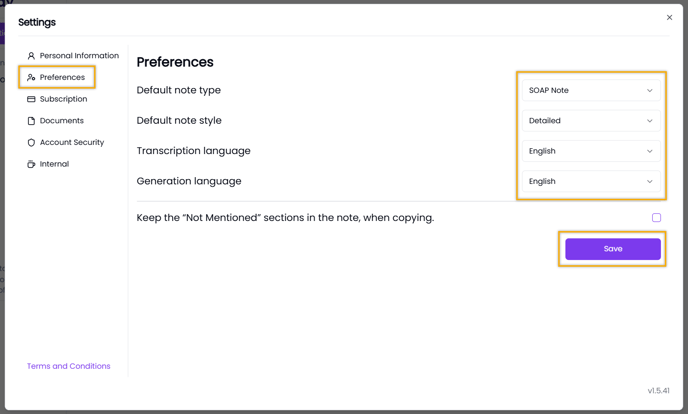
3. Click Save to apply changes.
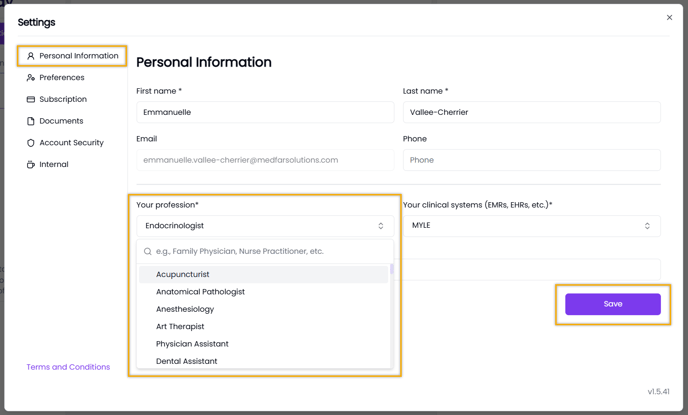
Profession and Adapted Notes
You can also set your profession.
This allows us to suggest note templates tailored to your practice when generating notes. These templates are available in the For You section of the note type list.
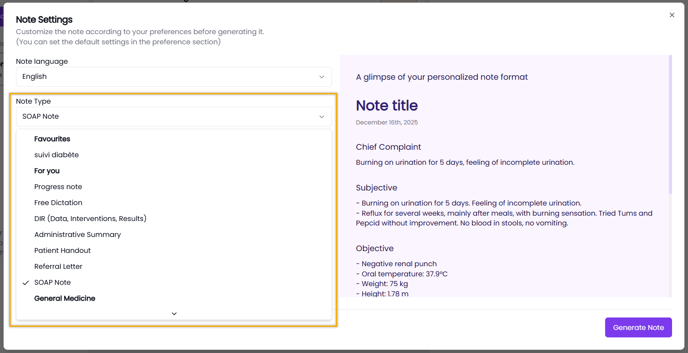
-
In Settings, open the Personal Information tab.
-
Select your Profession, then click Save.